Wednesday, January 13, 2016

Singleton beans with prototype-bean dependencies

When you use singleton-scoped beans with dependencies on prototype beans, be aware that dependencies are resolved at instantiation time. Thus if you dependency-inject a prototype-scoped bean into a singleton-scoped bean, a new prototype bean is instantiated and then dependency-injected into the singleton bean. The prototype instance is the sole instance that is ever supplied to the singleton-scoped bean.
However, suppose you want the singleton-scoped bean to acquire a new instance of the prototype-scoped bean repeatedly at runtime. You cannot dependency-inject a prototype-scoped bean into your singleton bean, because that injection occurs only once, when the Spring container is instantiating the singleton bean and resolving and injecting its dependencies. If you need a new instance of a prototype bean at runtime more than once, see Section 4.4.6, “Method injection”


4.4.6 Method injection

In most application scenarios, most beans in the container are singletons. When a singleton bean needs to collaborate with another singleton bean, or a non-singleton bean needs to collaborate with another non-singleton bean, you typically handle the dependency by defining one bean as a property of the other. A problem arises when the bean lifecycles are different. Suppose singleton bean A needs to use non-singleton (prototype) bean B, perhaps on each method invocation on A. The container only creates the singleton bean A once, and thus only gets one opportunity to set the properties. The container cannot provide bean A with a new instance of bean B every time one is needed.
A solution is to forego some inversion of control. You can make bean A aware of the container by implementing the ApplicationContextAware interface, and by making a getBean("B") call to the container ask for (a typically new) bean B instance every time bean A needs it. The following is an example of this approach:
// a class that uses a stateful Command-style class to perform some processing
package fiona.apple;

// Spring-API imports
import org.springframework.beans.BeansException;
import org.springframework.context.ApplicationContext;
import org.springframework.context.ApplicationContextAware;

public class CommandManager implements ApplicationContextAware {

 private ApplicationContext applicationContext;

 public Object process(Map commandState) {
    // grab a new instance of the appropriate Command
    Command command = createCommand();
    // set the state on the (hopefully brand new) Command instance
    command.setState(commandState);
    return command.execute();
 }

 protected Command createCommand() {
    // notice the Spring API dependency!
    return this.applicationContext.getBean("command", Command.class);
 }

 public void setApplicationContext(ApplicationContext applicationContext)
                                                                  throws BeansException {
    this.applicationContext = applicationContext;
 }
}
The preceding is not desirable, because the business code is aware of and coupled to the Spring Framework. Method Injection, a somewhat advanced feature of the Spring IoC container, allows this use case to be handled in a clean fashion.

4.4.6.1 Lookup method injection

Lookup method injection is the ability of the container to override methods on container managed beans, to return the lookup result for another named bean in the container. The lookup typically involves a prototype bean as in the scenario described in the preceding section. The Spring Framework implements this method injection by using bytecode generation from the CGLIB library to generate dynamically a subclass that overrides the method.
[Note]Note
For this dynamic subclassing to work, you must have the CGLIB jar(s) in your classpath. The class that the Spring container will subclass cannot be final, and the method to be overridden cannot be final either. Also, testing a class that has an abstract method requires you to subclass the class yourself and to supply a stub implementation of the abstract method. Finally, objects that have been the target of method injection cannot be serialized.
Looking at the CommandManager class in the previous code snippet, you see that the Spring container will dynamically override the implementation of the createCommand() method. Your CommandManager class will not have any Spring dependencies, as can be seen in the reworked example:
package fiona.apple;

// no more Spring imports! 

public abstract class CommandManager {

 public Object process(Object commandState) {
    // grab a new instance of the appropriate Command interface
    Command command = createCommand();
    // set the state on the (hopefully brand new) Command instance
    command.setState(commandState);
    return command.execute();
 }

  // okay... but where is the implementation of this method?
 protected abstract Command createCommand();
}

In the client class containing the method to be injected (the CommandManager in this case), the method to be injected requires a signature of the following form:
<public|protected> [abstract] <return-type> theMethodName(no-arguments);

If the method is abstract, the dynamically-generated subclass implements the method. Otherwise, the dynamically-generated subclass overrides the concrete method defined in the original class. For example:
<!-- a stateful bean deployed as a prototype (non-singleton) -->
<bean id="command" class="fiona.apple.AsyncCommand" scope="prototype">
<!-- inject dependencies here as required -->
</bean>

<!-- commandProcessor uses statefulCommandHelper -->
<bean id="commandManager" class="fiona.apple.CommandManager">
<lookup-method name="createCommand" bean="command"/>
</bean>

The bean identified as commandManager calls its own method createCommand() whenever it needs a new instance of the command bean. You must be careful to deploy the commandbean as a prototype, if that is actually what is needed. If it is deployed as a singleton, the same instance of the command bean is returned each time.
[Tip]Tip
The interested reader may also find the ServiceLocatorFactoryBean (in the org.springframework.beans.factory.config package) to be of use. The approach used in ServiceLocatorFactoryBean is similar to that of another utility class, ObjectFactoryCreatingFactoryBean, but it allows you to specify your own lookup interface as opposed to a Spring-specific lookup interface. Consult the JavaDocs for these classes as well as this blog entry for additional information ServiceLocatorFactoryBean.

spring scoped proxy bean

Ref:- http://docs.spring.io/spring/docs/2.5.x/reference/beans.html#beans-factory-scopes-other-injection

3.4.4.5. Scoped beans as dependencies

Being able to define a bean scoped to a HTTP request or Session (or indeed a custom scope of your own devising) is all very well, but one of the main value-adds of the Spring IoC container is that it manages not only the instantiation of your objects (beans), but also the wiring up of collaborators (or dependencies). If you want to inject a (for example) HTTP request scoped bean into another bean, you will need to inject an AOP proxy in place of the scoped bean. That is, you need to inject a proxy object that exposes the same public interface as the scoped object, but that is smart enough to be able to retrieve the real, target object from the relevant scope (for example a HTTP request) and delegate method calls onto the real object.
[Note]Note
You do not need to use the <aop:scoped-proxy/> in conjunction with beans that are scoped as singletons or prototypes. It is an error to try to create a scoped proxy for a singleton bean (and the resulting BeanCreationException will certainly set you straight in this regard).
Let's look at the configuration that is required to effect this; the configuration is not hugely complex (it takes just one line), but it is important to understand the “why” as well as the “how” behind it.
<?xml version="1.0" encoding="UTF-8"?>
<beans xmlns="http://www.springframework.org/schema/beans"
       xmlns:xsi="http://www.w3.org/2001/XMLSchema-instance"
       xmlns:aop="http://www.springframework.org/schema/aop"
       xsi:schemaLocation="
http://www.springframework.org/schema/beans http://www.springframework.org/schema/beans/spring-beans-2.5.xsd
http://www.springframework.org/schema/aop http://www.springframework.org/schema/aop/spring-aop-2.5.xsd">

    <!-- a HTTP Session-scoped bean exposed as a proxy -->
    <bean id="userPreferences" class="com.foo.UserPreferences" scope="session">
          
          <!-- this next element effects the proxying of the surrounding bean -->
          <aop:scoped-proxy/>
    </bean>
    
    <!-- a singleton-scoped bean injected with a proxy to the above bean -->
    <bean id="userService" class="com.foo.SimpleUserService">
    
        <!-- a reference to the proxied 'userPreferences' bean -->
        <property name="userPreferences" ref="userPreferences"/>

    </bean>
</beans>
To create such a proxy, you need only to insert a child <aop:scoped-proxy/> element into a scoped bean definition (you may also need the CGLIB library on your classpath so that the container can effect class-based proxying; you will also need to be using Appendix A, XML Schema-based configuration). So, just why do you need this <aop:scoped-proxy/> element in the definition of beans scoped at therequestsessionglobalSession and 'insert your custom scope here' level? The reason is best explained by picking apart the following bean definition (please note that the following'userPreferences' bean definition as it stands is incomplete):
<bean id="userPreferences" class="com.foo.UserPreferences" scope="session"/>

<bean id="userManager" class="com.foo.UserManager">
    <property name="userPreferences" ref="userPreferences"/>
</bean>
From the above configuration it is evident that the singleton bean 'userManager' is being injected with a reference to the HTTP Session-scoped bean 'userPreferences'. The salient point here is that the 'userManager' bean is a singleton... it will be instantiated exactly once per container, and its dependencies (in this case only one, the 'userPreferences' bean) will also only be injected (once!). This means that the 'userManager' will (conceptually) only ever operate on the exact same 'userPreferences' object, that is the one that it was originally injected with. This is not what you want when you inject a HTTP Session-scoped bean as a dependency into a collaborating object (typically). Rather, what we do want is a single 'userManager' object, and then, for the lifetime of a HTTP Session, we want to see and use a 'userPreferences' object that is specific to said HTTP Session.
Rather what you need then is to inject some sort of object that exposes the exact same public interface as the UserPreferences class (ideally an object that is a UserPreferences instance) and that is smart enough to be able to go off and fetch the real UserPreferences object from whatever underlying scoping mechanism we have chosen (HTTP request, Session, etc.). We can then safely inject this proxy object into the 'userManager' bean, which will be blissfully unaware that the UserPreferences reference that it is holding onto is a proxy. In the case of this example, when aUserManager instance invokes a method on the dependency-injected UserPreferences object, it is really invoking a method on the proxy... the proxy will then go off and fetch the realUserPreferences object from (in this case) the HTTP Session, and delegate the method invocation onto the retrieved real UserPreferences object.
That is why you need the following, correct and complete, configuration when injecting request-session-, and globalSession-scoped beans into collaborating objects:
<bean id="userPreferences" class="com.foo.UserPreferences" scope="session">
    <aop:scoped-proxy/>
</bean>

<bean id="userManager" class="com.foo.UserManager">
    <property name="userPreferences" ref="userPreferences"/>
</bean>
3.4.4.5.1. Choosing the type of proxy created
By default, when the Spring container is creating a proxy for a bean that is marked up with the <aop:scoped-proxy/> element, a CGLIB-based class proxy will be created. This means that you need to have the CGLIB library on the classpath of your application.
Note: CGLIB proxies will only intercept public method calls! Do not call non-public methods on such a proxy; they will not be delegated to the scoped target object.
You can choose to have the Spring container create 'standard' JDK interface-based proxies for such scoped beans by specifying 'false' for the value of the 'proxy-target-class' attribute of the<aop:scoped-proxy/> element. Using JDK interface-based proxies does mean that you don't need any additional libraries on your application's classpath to effect such proxying, but it does mean that the class of the scoped bean must implement at least one interface, and all of the collaborators into which the scoped bean is injected must be referencing the bean via one of its interfaces.
<!-- DefaultUserPreferences implements the UserPreferences interface -->
<bean id="userPreferences" class="com.foo.DefaultUserPreferences" scope="session">
    <aop:scoped-proxy proxy-target-class="false"/>
</bean>

<bean id="userManager" class="com.foo.UserManager">
    <property name="userPreferences" ref="userPreferences"/>
</bean>

Spring lookup-method Example

App.java

package com.rajesh.learnjava.controller;

import org.springframework.context.ApplicationContext;
import org.springframework.context.support.ClassPathXmlApplicationContext;

import com.rajesh.learnjava.bean.ControllerClass;

public class App {
public static void main(String[] args) {
ApplicationContext context = new ClassPathXmlApplicationContext(
"applicationcontext.xml");

ControllerClass helloWorld = (ControllerClass) context.getBean("controller");

System.out.println("1st service : " + helloWorld.getServiceClass().getStr());


ControllerClass helloWorld2 = (ControllerClass) context.getBean("controller");

System.out.println("1st service : " + helloWorld2.getServiceClass().getStr());


System.out.println("##########  Below is the service call with lookup-method option in spring and see the results ##########");


ControllerClass controller = (ControllerClass) context.getBean("controller");

System.out.println("2nd service : " + controller.getServiceClasswithLookupMethod().getStr());

ControllerClass controller2 = (ControllerClass) context.getBean("controller");

System.out.println("2nd service : " + controller2.getServiceClasswithLookupMethod().getStr());

}
}


ControllerClass.java

package com.rajesh.learnjava.bean;

public class ControllerClass {

ServiceClass serviceClass;
ServiceClasswithLookupMethod serviceClasswithLookupMethod;

public ServiceClass getServiceClass() {
return serviceClass;
}

public void setServiceClass(ServiceClass serviceClass) {
this.serviceClass = serviceClass;
}

public ServiceClasswithLookupMethod getServiceClasswithLookupMethod() {
return serviceClasswithLookupMethod;
}

public void setServiceClasswithLookupMethod(
ServiceClasswithLookupMethod serviceClasswithLookupMethod) {
this.serviceClasswithLookupMethod = serviceClasswithLookupMethod;
}
}


ServiceClass.java

package com.rajesh.learnjava.bean;

public class ServiceClass {

private int counter;
public String getStr() {
return " counter is:" + (++counter);
}
}


applicationContext.xml

<beans xmlns="http://www.springframework.org/schema/beans"
xmlns:xsi="http://www.w3.org/2001/XMLSchema-instance"
xmlns:ws=" https://jax-ws.java.net/spring/core"
xsi:schemaLocation="http://www.springframework.org/schema/beans
http://www.springframework.org/schema/beans/spring-beans-3.0.xsd
https://jax-ws.java.net/spring/core 
    https://jax-ws.java.net/spring/core.xsd
    https://jax-ws.java.net/spring/servlet
    https://jax-ws.java.net/spring/servlet.xsd">
    
    <bean id="controller" class="com.rajesh.learnjava.bean.ControllerClass" scope="singleton">
<property name="serviceClass" ref="serviceClass" />
<lookup-method name="getServiceClasswithLookupMethod" bean="serviceClasswithLookupMethod"/>
</bean>

<bean id="serviceClass" class="com.rajesh.learnjava.bean.ServiceClass" scope="prototype">
</bean>
<bean id="serviceClasswithLookupMethod" class="com.rajesh.learnjava.bean.ServiceClasswithLookupMethod" scope="prototype">
</bean>
<bean id="myBean" class="com.mycompany.MyPrototypeBean" scope="prototype">
   <aop:scoped-proxy/>
 </bean>
</beans>


Below is the output of the program App.java If you observer the output closely, the first two lines, the count is incremented from 1 to 2 because we are getting same serviceClass instance in both the cases 
whereas we are getting counter value as 1 and 1 for the 2nd set of statements. This is because, we are getting new instance of ServiceClass (using the lookup-method) each time into the Controller class even though COntroller class in defined with singleton scope.


1st service :  counter is:1
1st service :  counter is:2
##########  Below is the service call with lookup-method option in spring and see the results ##########
2nd service :  counter is:1

Wednesday, January 6, 2016

Explore the Dynamic Proxy API

Ref:- http://www.javaworld.com/article/2076233/java-se/explore-the-dynamic-proxy-api.html

Transactions, Caching and AOP: understanding proxy usage in Spring

Ref:- https://spring.io/blog/2012/05/23/transactions-caching-and-aop-understanding-proxy-usage-in-spring

In the Spring framework, many technical features rely on proxy usage. We are going to go in depth on this topic using three examples: TransactionsCaching and Java Configuration.
All the code samples shown in this blog entry are available on my github account.

Transactions

First step: no transaction

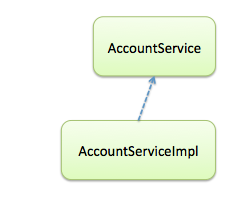
The Service class below is not transactional yet. Let’s first look at it as is and then make it become transactional.

@Service
public class AccountServiceImpl  implements AccountService {
 //…

//Not specifying a transaction policy here!
 public void create(Account account) {
 entityManager.persist(account);
 }
}
Since the method “create” is not transactional, it will most likely throw an exception (because this Account object should not be persisted outside of a transaction).
Here is what we have at runtime:


Second step: adding transactional behavior configuration


Let us now add @Transactional on top of the create(…) method:

@Service
public class AccountServiceImpl  implements AccountService {
 @PersistenceContext
 private EntityManager entityManager;

 @Transactional
 public void create(Account account) {
 entityManager.persist(account);
 }

}
And here is the corresponding Spring configuration:

<bean id="transactionManager">
 <property name="entityManagerFactory" ref="entityManagerFactory" />
</bean>

<tx:annotation-driven/>
Inside Spring generic configuration, we have used  <tx:annotation-driven /> . It means that all @Transactional annotations should be scanned at startup time and the targeted methods should become transactional. So where is the transactional behavior happening?
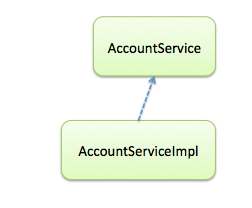
Before startup, we still have the same files as before:
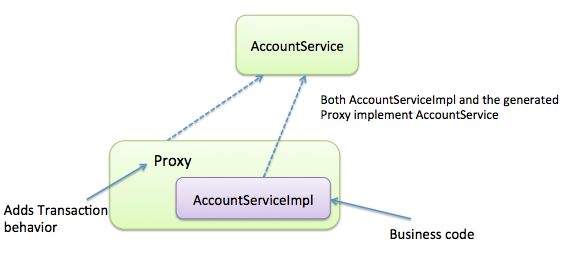
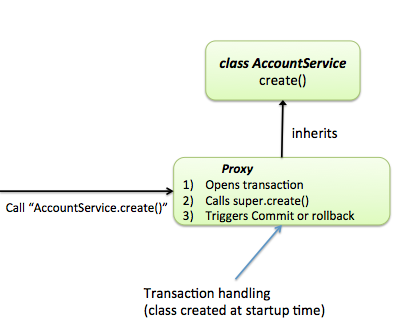
At startup time, a new class is created, called proxy. This one is in charge of adding Transactional behavior as follows:
The generated proxy class comes on top of AccountServiceImpl. It adds Transactional behavior to it [1].
So how to make sure that a proxy is indeed being used? For your own understanding, it’s interesting to go back into the code and see with your very eyes that you are indeed using a proxy.
A simple way is to print out the class name:


AccountService accountService = (AccountService) applicationContext.getBean(AccountService.class);
String accountServiceClassName = accountService.getClass().getName();
logger.info(accountServiceClassName);
On my computer, it shows the following output:


INFO : transaction.TransactionProxyTest - $Proxy13
This class is a Dynamic Proxy, generated by Spring using the JDK Reflection API (more information here).
At shutdown (eg. When the application  is stopped), the proxy class will be destroyed and you will only have AccountService and AccountServiceImpl on the file system:

How does Spring wire the proxy in-lieu of the target class?


Let us consider a consider a class that uses an instance of AccountService:


```java
@Controller
public class AccountController {
private AccountService accountService;
private void setAccountService(AccountService accountService) {
this.accountService=accountService;
}
//…
}
```

The attribute accountService is of type AccountService (interface). The variable dependency is on the interface type AccountService, not the implementation type, which reduces the coupling between classes. This is a best practice.
As seen before, both AccountServiceImpl and the generated Proxy implement the interface AccountService.
•    If there is a proxy, Spring injects the proxy
•    If not, Spring injects the instance of type AccountServiceImpl.


Caching


Declarative caching is a new feature in Spring 3.1 that works like Spring’s declarative transaction support.
The @Cacheable annotation should be used in that way:


```java
public class AccountServiceImpl  implements AccountService {
@Cacheable(value=“accounts”, key=“#id”)
public Account findAccount (long id) {
// only enter method body if result is not in the cache already
}
}
```
You should also have enabled caching inside Spring configuration as follows:

<cache:annotation-driven />
Here are the expected results:

accountService.findAccount (1); // Result stored into cache for key “1”
accountService.findAccount (1); // Result retrieved from cache. Target method not called.
accountService.findAccount (2); // Result stored into cache for key “2”
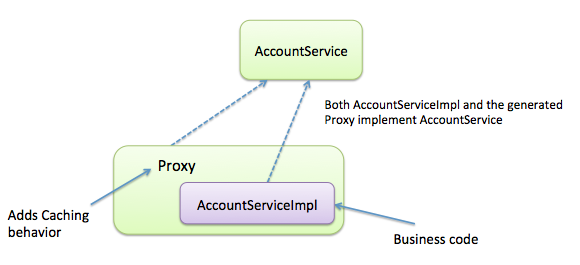
At runtime, a proxy is used to add Caching behavior.


Note: Spring 3.1 embeds a fairly simple cache implementation. It is usually recommended to use another implementation such as ehcache. On the sample application available here (https://github.com/michaelisvy/proxy-samples), you’ll find some examples using both the embedded cache implementation and ehcache.

What if the bean class does not implement any interface?


In the previous example, we mentioned that a proxy should implement the same Interface as your bean.
Thankfully, Spring can also proxy beans that don’t have an interface. There are many cases where implementing an interface is not the best way to go.
By default, if your bean does not implement an interface, Spring uses technical inheritance: at startup time, a new class is created. It inherits from your bean class and adds behavior in the child methods.

In order to generate such proxies, Spring uses a third party library called cglib. Unfortunately, this project is not active anymore. In Spring 3.2, it is very likely that Spring will be using Javassist instead by default (see here for more details).


Note: this section requires some background knowledge of Java Configuration in Spring. Please feel free to skip it if you are not comfortable with this new configuration style.
You can learn more about Java Configuration here.  There is also an excellent article which discusses the various configuration styles here.

When using Java Configuration, the configuration is stored in a Java class such as this one:


```java
@Configuration
public class JavaConfig {
@Bean
public AccountService accountService() {
return new AccountServiceImpl((accountRepository());
}
@Bean
public AccountRepository accountRepository () {
//…
}
}
```
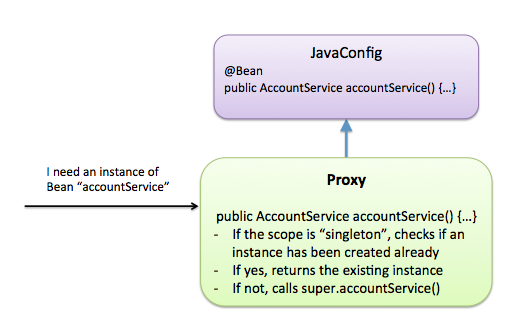
Spring calls the method accountService() every time it needs to wire an instance of the bean “accountService” and this one returns a “new” object of type AccountService. If 10 beans are using a dependency of type AccountService, this method is called 10 times.
However, no matters the Spring configuration has been made using Java Configuration or not, every bean should be a singleton by default. How is that possible and where is the magic happening?
This diagram explains how things work internally:


So the Proxy is adding behavior there. In the case that your bean should be a singleton, the action to turn your Plain Old Java Object into a singleton is performed by a child class (Proxy).


Conclusion


We’ve seen some use-cases on how proxies are used inside the Spring framework. There are many other examples: Aspect Oriented Programming, Security (using Spring Security), thread safety, scopes, etc…

Monday, January 4, 2016

Spring @Qualifier Annotation

Ref:- http://www.tutorialspoint.com/spring/spring_qualifier_annotation.htm

There may be a situation when you create more than one bean of the same type and want to wire only one of them with a property, in such case you can use @Qualifier annotation along with @Autowired to remove the confusion by specifying which exact bean will be wired. Below is an example to show the use of @Qualifier annotation.

Example:

Let us have working Eclipse IDE in place and follow the following steps to create a Spring application:
StepDescription
1Create a project with a name SpringExample and create a packagecom.tutorialspoint under the src folder in the created project.
2Add required Spring libraries using Add External JARs option as explained in the Spring Hello World Example chapter.
3Create Java classes StudentProfile and MainApp under thecom.tutorialspoint package.
4Create Beans configuration file Beans.xml under the src folder.
5The final step is to create the content of all the Java files and Bean Configuration file and run the application as explained below.
Here is the content of Student.java file:
package com.tutorialspoint;

public class Student {
   private Integer age;
   private String name;

   public void setAge(Integer age) {
      this.age = age;
   }
   
   public Integer getAge() {
      return age;
   }

   public void setName(String name) {
      this.name = name;
   }
   
   public String getName() {
      return name;
   }
}
Here is the content of Profile.java file:
package com.tutorialspoint;

import org.springframework.beans.factory.annotation.Autowired;
import org.springframework.beans.factory.annotation.Qualifier;

public class Profile {
   @Autowired
   @Qualifier("student1")
   private Student student;

   public Profile(){
      System.out.println("Inside Profile constructor." );
   }

   public void printAge() {
      System.out.println("Age : " + student.getAge() );
   }

   public void printName() {
      System.out.println("Name : " + student.getName() );
   }
}
Following is the content of the MainApp.java file:
package com.tutorialspoint;

import org.springframework.context.ApplicationContext;
import org.springframework.context.support.ClassPathXmlApplicationContext;

public class MainApp {
   public static void main(String[] args) {
      ApplicationContext context = new ClassPathXmlApplicationContext("Beans.xml");

      Profile profile = (Profile) context.getBean("profile");

      profile.printAge();
      profile.printName();
   }
}
Consider the example of following configuration file Beans.xml:
<?xml version="1.0" encoding="UTF-8"?>

<beans xmlns="http://www.springframework.org/schema/beans"
    xmlns:xsi="http://www.w3.org/2001/XMLSchema-instance"
    xmlns:context="http://www.springframework.org/schema/context"
    xsi:schemaLocation="http://www.springframework.org/schema/beans
    http://www.springframework.org/schema/beans/spring-beans-3.0.xsd
    http://www.springframework.org/schema/context
    http://www.springframework.org/schema/context/spring-context-3.0.xsd">

   <context:annotation-config/>

   <!-- Definition for profile bean -->
   <bean id="profile" class="com.tutorialspoint.Profile">
   </bean>

   <!-- Definition for student1 bean -->
   <bean id="student1" class="com.tutorialspoint.Student">
      <property name="name"  value="Zara" />
      <property name="age"  value="11"/>
   </bean>

   <!-- Definition for student2 bean -->
   <bean id="student2" class="com.tutorialspoint.Student">
      <property name="name"  value="Nuha" />
      <property name="age"  value="2"/>
   </bean>

</beans>
Once you are done with creating source and bean configuration files, let us run the application. If everything is fine with your application, this will print the following message:
Inside Profile constructor.
Age : 11
Name : Zara